Everything you do online—from browsing to shopping to using social networks—is tracked, typically as behavioral or advertising data. But browser extensions are simple, generally free add-ons that you can use to slow down or break this type of data collection, without completely ruining your experience of using the internet.
Wireless mice are convenient—they don’t clutter up desk space with wires, and they can make for faster and easier navigation than a trackpad. They’re also inexpensive and reliable enough to make more sense than a cheap wired mouse for most people. We’ve researched and tested mice for years with several different panels of testers, and we’ve found that the Logitech M720 Triathlon is more comfortable for a variety of hand sizes and grip styles than nearly every other wireless mouse we’ve considered.
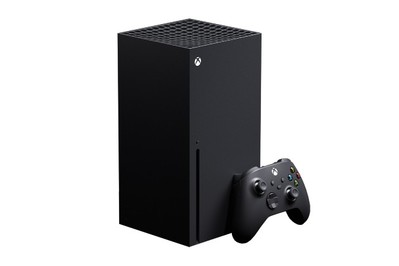
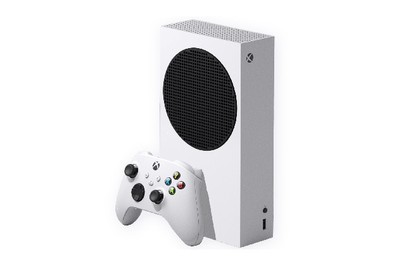
After a seven-year run, Microsoft has stopped making the Xbox One, and a new generation of video game consoles is here. The $500 Xbox Series X and the $300 Xbox Series S may both be part of the same generation, but each model targets a different level of speed and graphics performance, and that might make it difficult for you to figure out which one to buy.
Get the Series X if you’ll use it with a 4K TV (now, or eventually), want the absolute best in graphics like raytraced lighting effects, or if you want a disc drive for games and movies.
With better graphics, more storage, and a disc drive, the Xbox Series X is worth the higher price in many cases. If you have a 4K TV or will buy one in the next few years, you’ll likely come across games that can take advantage of the extra graphics capability on the Series X over the Xbox Series S. And although both consoles have impressively fast storage that improves boot-up and load times, the Series X drive has over 800 GB available internally, nearly twice the storage space in the Series S. Plus, if you have a collection of physical Xbox One, Xbox 360, or original-Xbox games that you want to keep playing, only the Series X has a disc drive, making that model the only choice if you want a console that can also be your 4K Blu-ray player.
Games on the Series S are unlikely to take advantage of TVs with 4K resolution, and it lacks a disc drive, a downside if you own a lot of physical games or movies, or like to buy them used. But it will still let you play the new generation of games, and is a great value when paired with a Game Pass Ultimate subscription.
On the other hand, if you don’t have a 4K TV (and won’t buy one soon), if space in your entertainment center is a concern, or if you don’t have or plan to buy many physical discs, the Xbox Series S offers a lot of value and still gives you the chance to play the new generation of games to come. And anyone who mostly plays games from Xbox Game Pass—the monthly subscription service with access to hundreds of games, including new releases—probably won’t miss the disc drive. We also think that makes the Xbox Series S an especially budget-conscious choice for younger kids, since the less expensive console and monthly membership add up to more games than a kid can play, with no need to buy new ones all the time.
If the only reason you’d buy a new console is for brand-new games you can’t play on your existing Xbox One (or, for that matter, a PlayStation 4), we don’t think you should rush into the next generation just yet. But if you spend a lot of time with your Xbox One now and are ready for plenty of immediately noticeable quality of life improvements and conveniences, as well as performance and visual improvements in the games you already have, an Xbox Series X or Series S will provide those benefits right now.
If a traditional Wi-Fi or mesh network isn’t cutting it in your larger home, and you don’t want to (or can’t) drill holes and snake Ethernet cable through your walls, you’ve got more options: powerline networking and MoCA (multimedia over coaxial alliance). Powerline networking uses your home’s electrical wiring to share your internet connection, bypassing Wi-Fi and its limitations, while MoCA works similarly over the cable TV wiring in your home. After spending more than 45hours testing eleven kits, we’ve found the TP-Link’s TL-PA9020P to be the best powerline networking kit for most people.
Most hair dryers are effective at blowing hot air toward your head—sometimes quite fast—in order to speed along your hair styling from showering to whatever’s next. It’s the small differences between models that can make a big difference overall, particularly in daily use. After putting in 20 hours of research and spending nearly 30 hours testing 23 dryers, we found that some dryers are far more pleasant to hold and use than others. Because it provides an excellent experience for the price, we think the Rusk W8less is the best choice for most people.
The light switch is a fine device, but how many other technologies from the 1880s do you still use in your home? Smart lighting—bulbs, switches, plug-in outlets—can transform the feel of being at home, especially when you go beyond the most basic ways of controlling them, namely turning them on or off, through an app. With just a few accessories and some app magic, you can make your smart home shine.
Superfans of Wirecutter know that every month, we publish a list of the top-selling products recommended on our site. Look through enough of them, and you get a glimpse not just of what readers are buying, but how those habits change (readers loved towels last year, but quarantine calls for resistance bands).
What readers are buying only provides part of the story, though. There’s also what Wirecutter fans are reading—the posts about things they’re researching, comparison-shopping, and, well, thinking about buying. And that’s not even to mention the Wirecutter pieces that don’t have much to do with shopping at all: the stories in which we bust myths, give advice, and answer burning reader questions.